NoteLoom Desktop Local Markdown & AI Workspace
Native plain-text editing, embedded system console, and transparently guardrailed AI. A professional personal knowledge workspace out of the box. Reading, search and editing keep working offline, and the data stays yours.
Prefer zero install? Open NoteLoom Web App in browser →
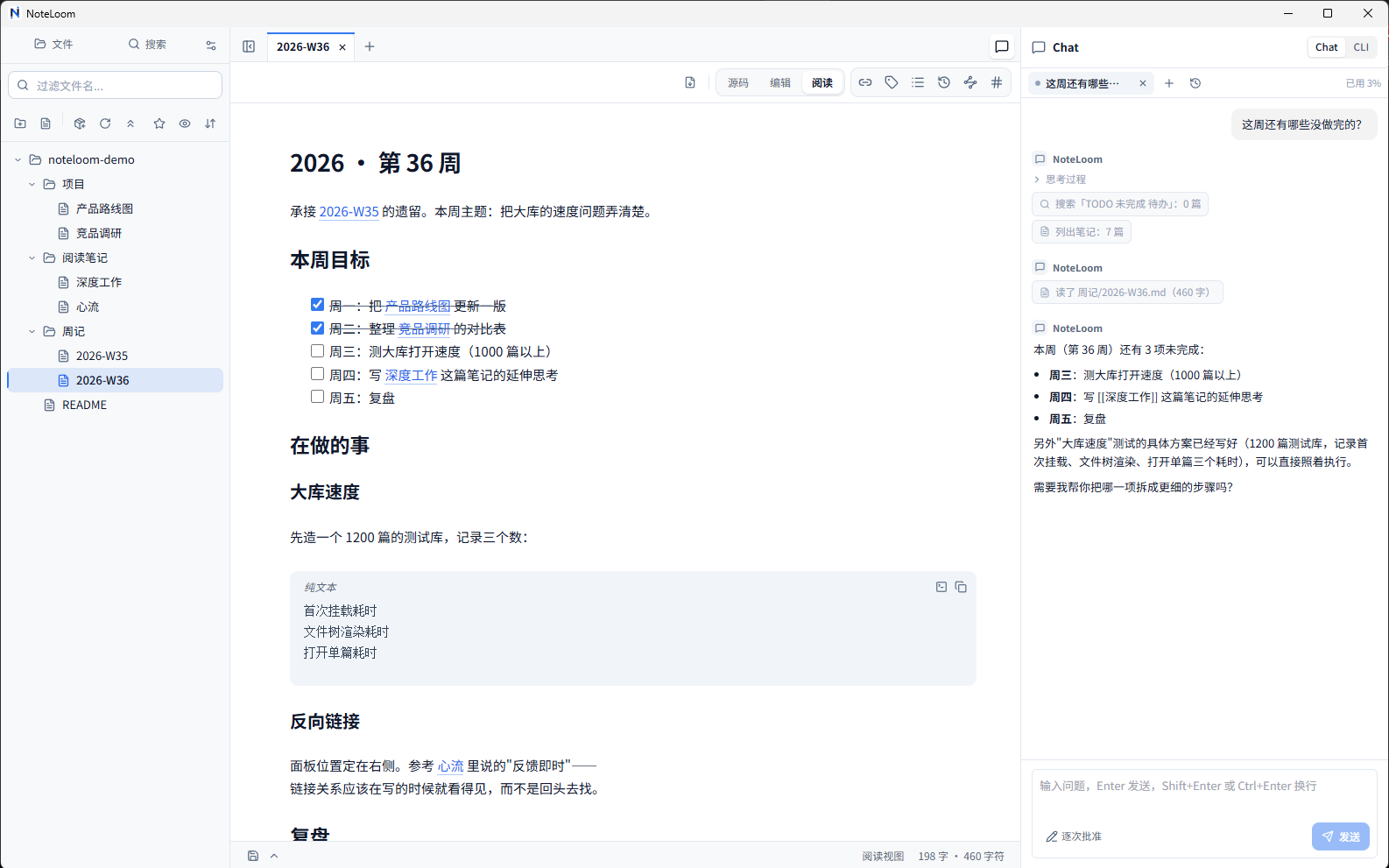
Mount your existing folder or vault directly; instant bi-directional links while files remain pure standard Markdown
Switch between raw source, live hybrid rendering, and distraction-free reading, with clickable task checkboxes
Structured reasoning logs and tool calls in plain sight; default "Approve each change" mode requires your explicit sign-off before writing
Native system console right beside your notes; watch automated tasks land on disk with instantaneous live reloading
Not just a vault. Your personal command center.
One screen for thinking, reading, and execution. Notes on the left, system console on the right, AI on call.
Understands your vault, obeys your rules
Desktop & WebNo manual copy-pasting. The model traverses directories, retrieves context, and collaborates directly under your supervision.
- Transparent thinking: structured reasoning logs and tool calls in plain sight, with zero black-box magic
- Guardrailed sandbox: default "Approve each change" requires explicit diff confirmation before any file touches disk
- Bring your own key: native end-to-end support for DeepSeek and Zhipu GLM, or use the built-in free allowance
System console on the right, live disk sync
Desktop ExclusiveA native system console permanently docked in the sidebar. Run automation tasks, CLI agents, or daily scripts right next to your docs.
- Windows native PTY: full support for keyboard shortcuts, ANSI 256-color, and true-color terminal output
- Process awareness: automatically detects running tasks and surfaces execution status at a glance
- Instant disk sync: the moment tasks modify files on disk, the editor view updates immediately without manual reloads
No migration needed. Bring your whole vault.
Zero Vendor Lock-inPoint it at an existing Markdown folder or notes library. No importing, no conversion, and fully readable in any editor anytime.
- In-place read & write: preserves your directory structure and files without generating proprietary cache bloat
- Batteries included: bi-directional links, backlinks, dynamic outlines, and syntax highlighting without plugin fatigue
- Your permanent assets: standard Markdown that stays forever readable, immune to vendor lock-in
Pull the plug. It stays 100% functional.
Absolute SovereigntyLocal-first with no mandatory sign-up and no cloud dependencies. On a flight or deep in the mountains, editing and search remain lightning fast.
- Local-first engine: full-text search indexing and link parsing run at native speed without network access
- Physical privacy boundary: zero analytics telemetry on notes; your private thoughts never leak to the cloud
- Safe from sunsetting: no servers to shut down; your notes remain safely stored on your own physical drive
Under one minute to your workspace.
No admin rights required, zero complex environment dependencies. Double-click to launch.
Double-click NoteLoom setup (~95.7 MB). Installs into user space with no admin password required, even on locked-down company laptops.
Select your existing Markdown folder or vault; directory trees and internal links index in milliseconds.
Read and write comfortably on the left, run commands or ask AI on the right, without leaving the window.
Real details you may want to know before switching to NoteLoom
Straightforward answers on workflow compatibility, privacy, and costs without marketing fluff.
Why choose NoteLoom Desktop over the Web App?
Can I open the same folder in NoteLoom and other editors at the same time?
Is it really safe to let AI rewrite my local notes?
Are my notes ever secretly uploaded to cloud servers?
Is it truly free? Are there hidden paywalls coming?
Does it work smoothly offline, on flights, or inside corporate firewalls?
Does NoteLoom Desktop run on macOS or Linux?
NoteLoom Desktop
Local Markdown & AI Workspace.
Native plain-text editing, zero accounts, zero lock-in. Speed, privacy and AI assistance on your own machine.